
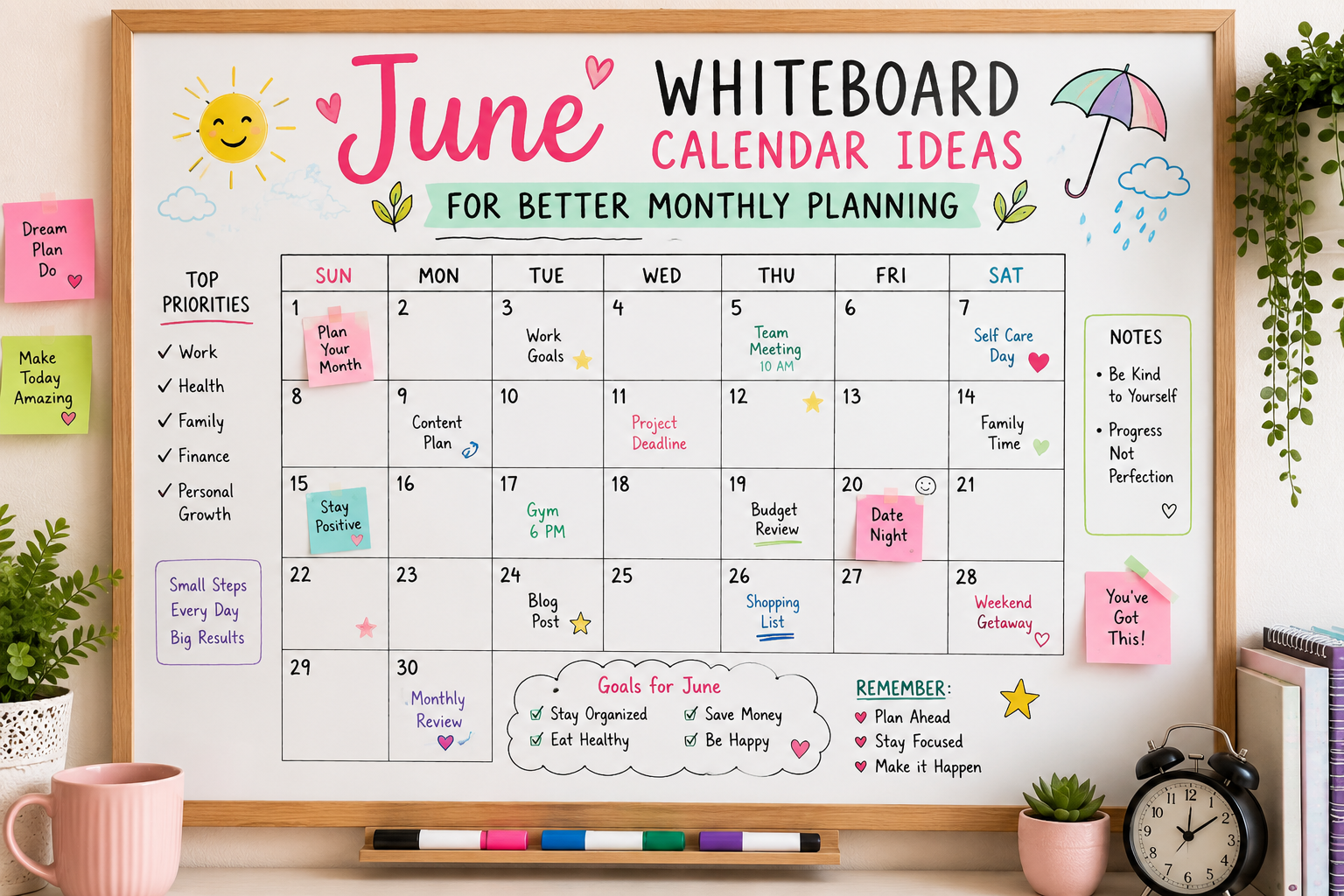
There is something deeply satisfying about a blank whiteboard on the first of the month. A clean slate. A whole new thirty days spread out in front of you, waiting to be filled with plans, goals, reminders, and the particular chaos of a life actually being lived.
June is one of the best months for it. Summer is officially here. The energy shifts. The days get longer and the to-do lists somehow feel lighter. And your whiteboard calendar? It deserves to look as good as the season feels.
Here are the best June whiteboard calendar ideas to make your monthly planning both beautiful and genuinely useful.
Why a Whiteboard Calendar Actually Works
Before the ideas — a quick word on why this format has taken over TikTok, Pinterest, and every aesthetically inclined home office in existence.
A whiteboard calendar is visible. Unlike a planner tucked in a drawer or a digital calendar buried behind seventeen open tabs, a whiteboard on the wall is always there. You walk past it, you glance at it, you absorb what is coming without having to actively check anything. That passive visibility is one of the most underrated productivity tools available and it costs nothing extra once you have the board.
It is also satisfying to update. The monthly reset — wiping the old month clean and building the new one from scratch — is genuinely one of the most motivating things you can do at the start of a new month. June 1st hits different when there is a beautiful, colour-coded whiteboard waiting to be built.
June Themes That Work Beautifully on a Whiteboard
The theme you choose sets the entire visual tone of the month. June is rich with options:
Sun and Sunflowers — bright yellows, warm oranges, bold sunflower doodles in the corners and around the date grid. Instantly cheerful. Works with both markers and chalk markers.
Under the Sea — ocean blues, turquoise waves along the bottom border, tiny fish, shells, and anchors as decorative accents. One of the most popular June whiteboard themes on Pinterest right now.
Tropical Botanicals — large palm leaves, hibiscus flowers, and monstera outlines framing the calendar grid. Use deep greens and vibrant pinks for maximum impact.
Strawberry Summer — red and green strawberry doodles scattered throughout, pale pink as the main accent colour. Sweet, simple, and incredibly popular on TikTok’s monthly reset content.
Sunset Gradient Border — create a gradient border using markers in pink, orange, coral, and yellow, blending softly from one corner to the other. No drawing skills required — just colour and blending.
Father’s Day Theme — since Father’s Day falls in June, incorporating subtle masculine elements like navy blue, plaid-inspired borders, or simple tie doodles gives the calendar a seasonally appropriate feel while highlighting that important date.
Layout Ideas That Maximise Your Planning
The Classic Grid
The most functional and most popular layout. Seven columns for the days of the week, four to five rows for the weeks of the month. Use a ruler and a fine-tip marker to draw clean lines. Leave enough space in each date box for at least two to three items.
June upgrade: Use a different colour for weekends, public holidays (Juneteenth falls on June 19th), and Father’s Day (third Sunday of June) so they stand out instantly from regular weekdays.
The Split Layout
Divide the board in half. The left side holds the full monthly calendar grid. The right side holds your planning sections — a goals column, a habit tracker, a weekly focus area, or a running to-do list. This is especially useful for people who use their whiteboard for both scheduling and goal tracking simultaneously.
The Weekly Strip
Instead of a traditional grid, divide the board into four horizontal strips — one per week of the month. Each strip has more space per day, making it ideal for people with complex daily schedules who need room to write more detail per date. Less visual but highly functional.
The Aesthetic Minimal
A clean, uncluttered grid with the month name in large decorative lettering at the top, simple line borders, and a limited colour palette of two or three shades. No illustrations, no doodles — just clean typography and colour. This is the quiet luxury version of the whiteboard calendar and it looks stunning in a home office or kitchen.
Color Coding System for June
Colour coding transforms a whiteboard from a list of dates into an actual planning system. The key is consistency — use the same colour for the same category every month so reading the calendar becomes instinctive.
A simple system that works for most households and offices:
- Blue — work meetings, deadlines, professional commitments
- Green — personal goals, fitness, self-care appointments
- Pink or red — family events, social plans, birthdays
- Orange — errands, admin, bills due
- Purple — travel, day trips, special occasions
- Yellow — reminders and flexible to-dos
Write a small colour key in the corner of the board for anyone else in the household who uses it. Once the system is established, a single glance at the board tells you everything about the shape of any given week.
Must-Mark June Dates to Include
A great whiteboard calendar includes not just your personal plans but the fixed dates that give the month its rhythm:
- June 1 — Start of Pride Month (rainbow accent for the date box is a popular touch)
- June 19 — Juneteenth — a federal holiday in the United States
- Third Sunday of June — Father’s Day (June 15th in 2025)
- June 20 or 21 — Summer Solstice — the longest day of the year and a genuinely fun date to highlight with a sun doodle
Marking these anchor dates first gives the rest of the month its structure before personal plans are added.
Tools and Supplies You Actually Need
Dry erase markers in multiple colours are the standard tool — they wipe cleanly and are widely available. Choose a set with both chisel and fine tips for flexibility between drawing borders and writing small text.
Chalk markers are the upgrade that TikTok and Pinterest have collectively fallen in love with. They produce a richer, more opaque colour than standard dry-erase markers and can be used on both whiteboards and chalkboards. They require a slightly damp cloth to erase rather than a dry one.
Sharpie permanent markers have become a viral alternative — as seen across TikTok’s whiteboard calendar content — for people who want their calendar to stay crisp and unfaded for the entire month without any accidental smearing. Note: permanent marker requires isopropyl alcohol to erase, not a regular whiteboard eraser.
A ruler for straight grid lines — absolutely worth the thirty seconds it takes.
A fine-tip white paint pen for adding highlights, details, or corrections over already-drawn lines.
Step-by-Step: Building Your June Whiteboard Calendar
Step 1 — Clean the board completely with a whiteboard eraser and a small amount of cleaning solution. Start with a completely blank surface.
Step 2 — Write the month name at the top in large decorative lettering. Add your chosen theme doodles or border design in the corners and edges first, before the grid.
Step 3 — Use a ruler to draw the calendar grid. Seven columns, five rows, with a header row for the day names (Sun, Mon, Tue, Wed, Thu, Fri, Sat).
Step 4 — Number the dates. June 2025 starts on a Sunday — write the 1 in the first box of the first week row and continue sequentially through to June 30.
Step 5 — Highlight fixed dates first — weekends, Juneteenth, Father’s Day, Summer Solstice — in their designated colours or with a small icon.
Step 6 — Add personal events, appointments, and plans.
Step 7 — Add your goals section, habit tracker, or planning sidebar if using a split layout.
Step 8 — Step back, admire it, photograph it for Pinterest, and start actually using it.
5 Small Details That Elevate the Whole Look
Consistent lettering style — even if you are not a hand-lettering expert, picking one style and sticking to it across all date numbers and labels makes the board look intentional.
A quote for the month — add a small motivational or seasonal quote somewhere on the board. It does not need much space and it makes the board feel personal rather than purely functional.
Icon system — use tiny consistent icons instead of or alongside text for recurring events. A small star for birthdays, a tiny plane for travel days, a heart for date nights or family events. Faster to draw than text and immediately recognisable.
Leave white space — the most common whiteboard calendar mistake is filling every single inch. White space is not wasted space — it is visual breathing room that makes the board easier to read and less overwhelming.
A habit tracker strip — add a small row of boxes along one edge of the board with a habit you want to build in June. Check off each day you complete it. Visible progress tracking on the same board as your calendar creates a sense of momentum that a separate tracker simply cannot match.
Frequently Asked Questions
What size whiteboard works best for a monthly calendar? A minimum of 24 by 36 inches is recommended for a standard monthly grid with readable date boxes. Larger is always better if wall space allows — 36 by 48 inches gives you room for both the calendar and a planning sidebar.
Can I use a chalkboard instead of a whiteboard? Absolutely. Chalk markers work on both surfaces and produce beautiful results on black chalkboards. The aesthetic is different — more vintage and warm compared to the clean, modern look of a white board — but the functionality is identical.
How do I keep grid lines straight? Use a long ruler or a level tool and draw lightly first in pencil if your board allows it, or in a pale grey marker that will be less visible against the final design. Washi tape is another popular method — apply it as a guide, draw the line, then remove.
How long does a whiteboard calendar take to set up? With a theme in mind and supplies ready, most people complete their monthly calendar setup in 30 to 45 minutes. The more elaborate the decoration, the longer it takes — but even a very simple, clean grid with colour coding takes under 20 minutes.
Final Thoughts
Your June whiteboard calendar is more than a scheduling tool. It is a visual anchor for the month — a daily reminder of what matters, what is coming, and how you want to spend the thirty days ahead.
Whether you go all-in with sunflower borders and a full colour-coding system or keep it clean and minimal with just the grid and two marker colours, the simple act of building the calendar at the start of the month sets an intention. You are not just tracking time. You are shaping it.
Happy planning. Happy June.